
Your account
Create an account, sign in, reset your password, change your details and delete your account.
Do I need an account to join an event?#
Yes. Anyone can open an event page, but to join you need to sign in: the button reads Sign in to Join until you do. After you sign in you come back to the same event. An account is free.
How do I create an account?#
- On theground.io, open the menu at the top right, click Login, then Sign up at the bottom.
- Fill in Email, Display Name, Username, your phone number (Hong Kong +852 is preselected; pick another country from the list) and a Password, twice.
- Click Sign up. You land on the sign-in page: sign in with your new username or e-mail and password.
- The password needs at least 8 characters, with a letter, a number and a special character such as
! @ # $ %, and no spaces. - The username needs at least 3 characters: letters, numbers,
_and-. - "An account with this email already exists" means you already have one: sign in, or use Forgot Username/Password?.
Can I sign up with Google?#
Yes. On the sign-in page click Continue with Google. The first time, The Ground asks for your phone number (Complete your registration); click Sign up and you're in. After that, always sign in with Continue with Google.
I forgot my password or username#
- On the sign-in page click Forgot Username/Password?.
- Enter the e-mail address of your account and click Send.
- Open the e-mail we send you (check your spam folder) and follow the link. On Reset password, enter the new password twice and click Confirm, then sign in.
If the page says "Your account was registered with Google Sign in, please continue with that", your account has no password: use Continue with Google. "User with this email does not exist" means the account uses another e-mail address.
How do I change my name, phone number or e-mail?#
Open Profile (the bottom bar on a phone) or Edit profile in the menu at the top right. Under Personal information you can change your Name, Bio, Phone number, Email address and your photo (Change icon: JPEG, PNG, GIF or WEBP, up to 5 MB). Click Save; it stays greyed out until you change something.
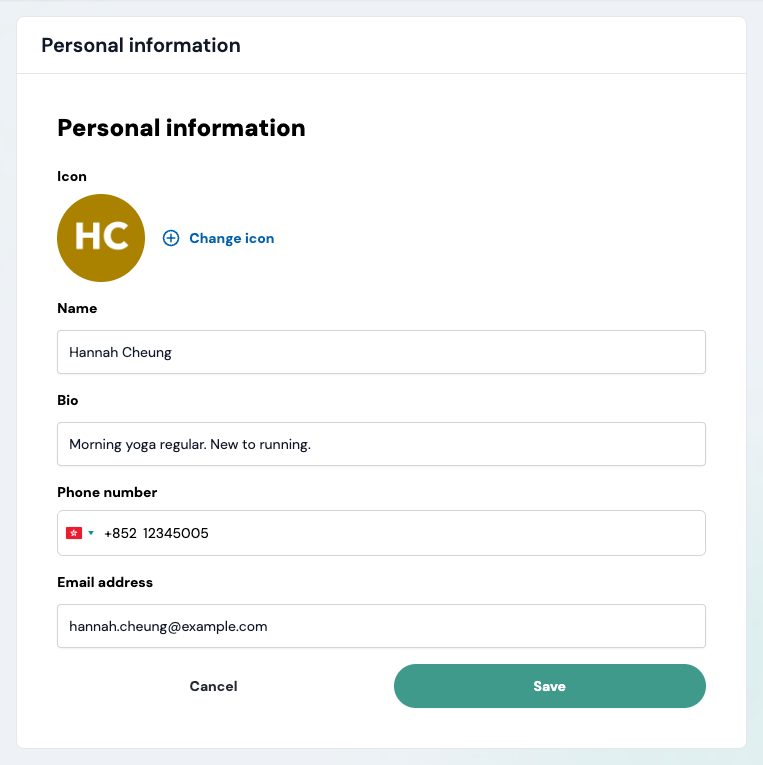
Organizers see your e-mail and phone number when you join their events, so keep them up to date.
Can I change my username?#
No, your username can't be changed.
How do I change my password?#
Edit profile → Change password: enter the New password and Confirm new password, then click Save. The rules are the same as when you signed up. If you sign in with Google, you don't need a password.
How do I delete my account?#
You can't delete your account in the app yet. E-mail info@theground.io from the e-mail address on your account and tell us your username. We'll confirm by e-mail once it's deleted.
Is The Ground in Chinese?#
The Ground is in English for now. Each organizer writes their own event details, in their own language.
Can I install The Ground as an app?#
Yes, you can add it to your home screen. Open the menu at the top right and click Install app. On an iPhone or iPad in Safari, tap Share, then Add to Home Screen, then Add.
The option doesn't appear inside other apps' browsers (Instagram, Facebook, WeChat…): open the link in Chrome or Safari first.