
What your status means
The two labels on your sign-up – whether you have a spot and where your payment stands – what each one means and what to do next.
Where do I see my status?#
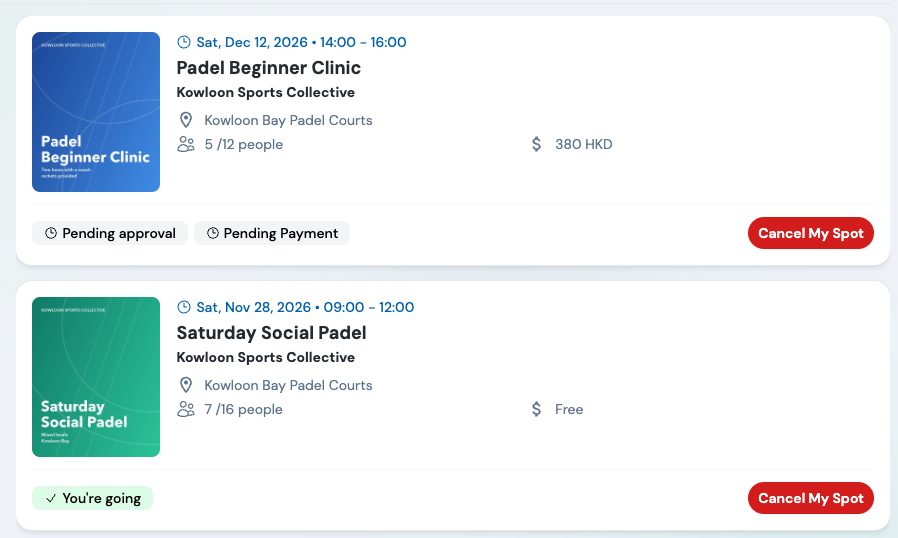
Once you've joined, the event page shows two labels under the event name: one for your spot and one for your payment. You see the same labels on the payment page and on your events in My events and Calendar.
What do the spot labels mean?#
| Label | What it means |
|---|---|
| You're going | You have a spot. On a paid event, check the payment label too. |
| Pending approval | You don't have a spot yet. On a paid event, it usually means your spot is waiting for your payment: you haven't paid yet (Pending Payment), or the organizer is still checking your transfer. On a free event, the organizer hasn't approved you yet. It can also mean the event was full when you joined and you're on the waiting list. |
| Cancelled | You cancelled your spot. |
| Declined | The organizer declined your request to join. |
| Checked in | You were checked in at the door. With several tickets it shows how many are in, e.g. Checked in · 1 / 2 seats. |
What do the payment labels mean?#
| Label | What it means |
|---|---|
| Free of charge | A free event: nothing to pay. |
| Pending Payment | You haven't paid yet, so your spot stays Pending approval. Pay on the payment page. |
| Payment Submitted (Submitted in My events) | You uploaded a receipt for a transfer, and the organizer hasn't checked it yet. |
| Payment Confirmed | You've paid: your online payment went through, or the organizer confirmed your transfer. |
| Payment Rejected | The organizer couldn't accept your payment, for example the amount or the screenshot doesn't match. |
| Payment Refunded (Refunded in My events) | The organizer refunded your payment in full. |
What does "Pending approval" mean?#
You don't have a spot yet. What it's waiting for shows in your payment label:
- Pending Payment: your spot is waiting for your payment. Every paid event needs the organizer's approval, and you get it by paying: click View Payment Page and pay. An online payment confirms your spot straight away while there's room; for a transfer, the organizer approves you once they've checked your receipt. See When do I need to pay?
- Payment Submitted or Payment Confirmed: you've paid, and the organizer still has to check your transfer or approve your spot.
- Free of charge: the event needs the organizer's approval.
- If the event was full when you joined, you're on the waiting list. On a paid event the payment page says You're on the waiting list, and payment opens once a spot frees up: see I'm on the waiting list.
- Your ticket's QR code appears once you're approved.
- Waiting a long time, or the event is close? Contact the organizer: their phone and e-mail are under Contact information on the event page.
What does "Pending Payment" mean?#
You haven't paid yet. Click View Payment Page on the event page to pay. On a paid event, the organizer approves your spot once you've paid: see When do I need to pay?
You also see Pending Payment after you join again or change your sign-up after a refund: the new sign-up needs paying.
What does "Payment Rejected" mean?#
The organizer couldn't accept your payment, usually because the transfer doesn't match: a different amount, or a screenshot that doesn't show the transfer. Upload the right receipt with Re-Upload Receipt on the payment page, or contact the organizer. If you were charged, ask them about a refund.
Common combinations#
| You see | What it means | What to do |
|---|---|---|
| Pending approval + Pending Payment | You've joined but haven't paid: your spot is waiting for your payment. | Pay on the payment page. Paying online confirms your spot straight away while there's room; for a transfer, the organizer approves you after checking your receipt. |
| Pending approval + Payment Submitted | You sent a receipt. The organizer hasn't confirmed your payment or your spot yet. | Wait for the organizer. |
| Pending approval + Payment Confirmed | You've paid, but your spot isn't confirmed yet. Either the organizer confirmed your transfer but hasn't approved you yet, or the event filled up while you were paying online. | Wait for the organizer, or contact them. |
| You're going + Payment Confirmed or Free of charge | You're all set. | Show your ticket at the door. |
| You're going + Payment Refunded | You were refunded but are still on the event. | Pay again if you still want to go. |
| Cancelled | You left the event. | Join again if the button is there. |
| Declined | The organizer didn't accept you. | If you paid, ask the organizer about a refund. |