
Promote your event
Get people to your event page – the Explore page, the invitation link, the WhatsApp share tool, e-mail invitations and inviting your existing members.
1. Be found on theground.io#
Set the event to Public. It is then listed on the Explore page (upcoming events, sorted by date, with your poster, price and spots) and on your organization's profile page. Public organizations are also listed under Featured organizers / See all. Make sure the organization has a logo, description and sport tags – they drive discovery.
2. Share the invitation link#
Information tab → Invitation Link → Copy Link. Paste it anywhere: WhatsApp groups, Instagram bio, Linktree, e-mail newsletter, your website. The link works for private events too.
3. WhatsApp share tool#
Member tab → Manage → Invitation → WhatsApp Link.
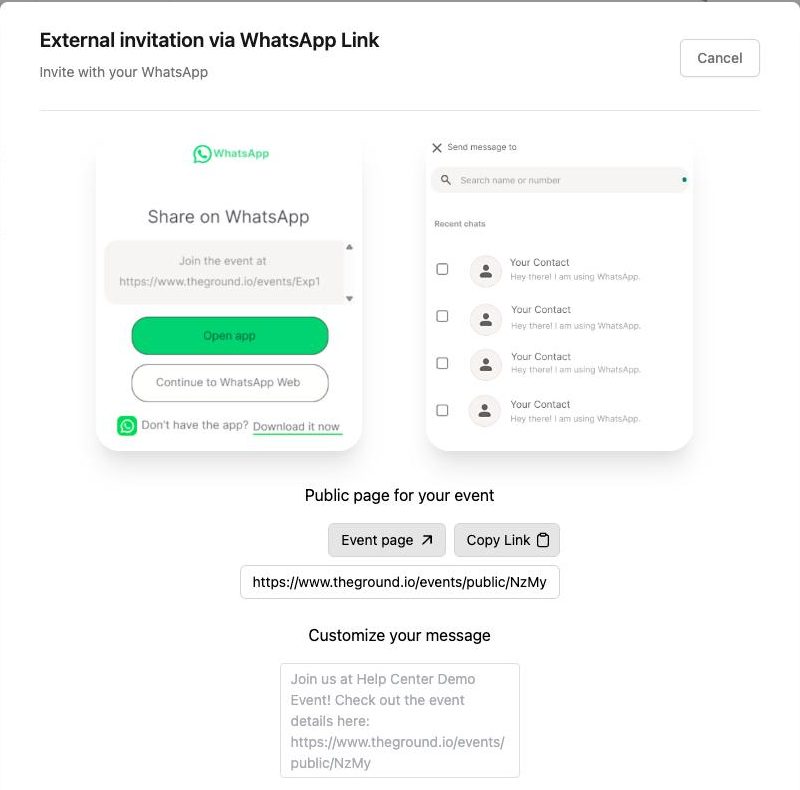
- The public page for your event and a pre-written message ("Join us at ‹event›! Check out the event details here: ‹link›") are shown. Edit the message under Customize your message.
- Click Share on WhatsApp – WhatsApp opens (app or web) with the message ready; pick the chats or groups to send it to.
4. E-mail invitations#
Member tab → Manage → Invitation → Email.
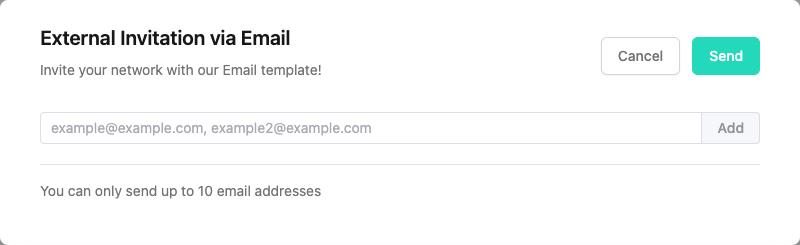
Type one or more addresses (comma-separated), click Add, then Send. Up to 10 addresses per batch ("You can only send up to 10 email addresses"). Recipients get The Ground's invitation e-mail template with a link to the event page.
5. Invite people already in your organization#
Member tab → Manage → Invitation → Existing Members lists everyone who has ever joined one of your events or teams. Tick the people (or Select All) and click Invite – they receive an invitation to this event.
This is the fastest way to reach your community for a new edition of a recurring event.
6. Add people directly#
If someone booked with you by phone or in person, add them yourself: Manage → Manual add/remove → Add Members (they must already have a The Ground account and be in your organization). See Invite people.
Checklist for a strong event page#
- 4:5 poster with the date on it
- First two lines of the description say what, when, where, how much
- Capacity set (scarcity shows as "15 spots")
- Public RSVP list on, so early joiners create social proof
- Early bird price with a deadline to reward fast sign-ups
- A sign-up form question that helps you plan (size, level, dietary needs)
- Contact e-mail that someone actually reads