
Admins and permissions
Add co-organizers as organization admins with an invitation link or from your member list, remove admins, and understand what each level can do.
Levels of access#
| Level | How you become one | Can do |
|---|---|---|
| Organization admin | Invited through the admin invitation link, or added by an existing admin | Everything for that organization: settings, Stripe, create/edit/delete events and teams, all members, notices, invite other admins |
| Event / team admin | Chosen by an organization admin in the event's or team's Setting → Admins | Manage that event or team (settings, members, payments, check-in, notices) |
| Member | Joined an event or team | Nothing in the admin – they use theground.io |
There is no owner role: all organization admins are equal, including the ability to delete the organization. Only give admin access to people you trust.
Invite an admin with a link#
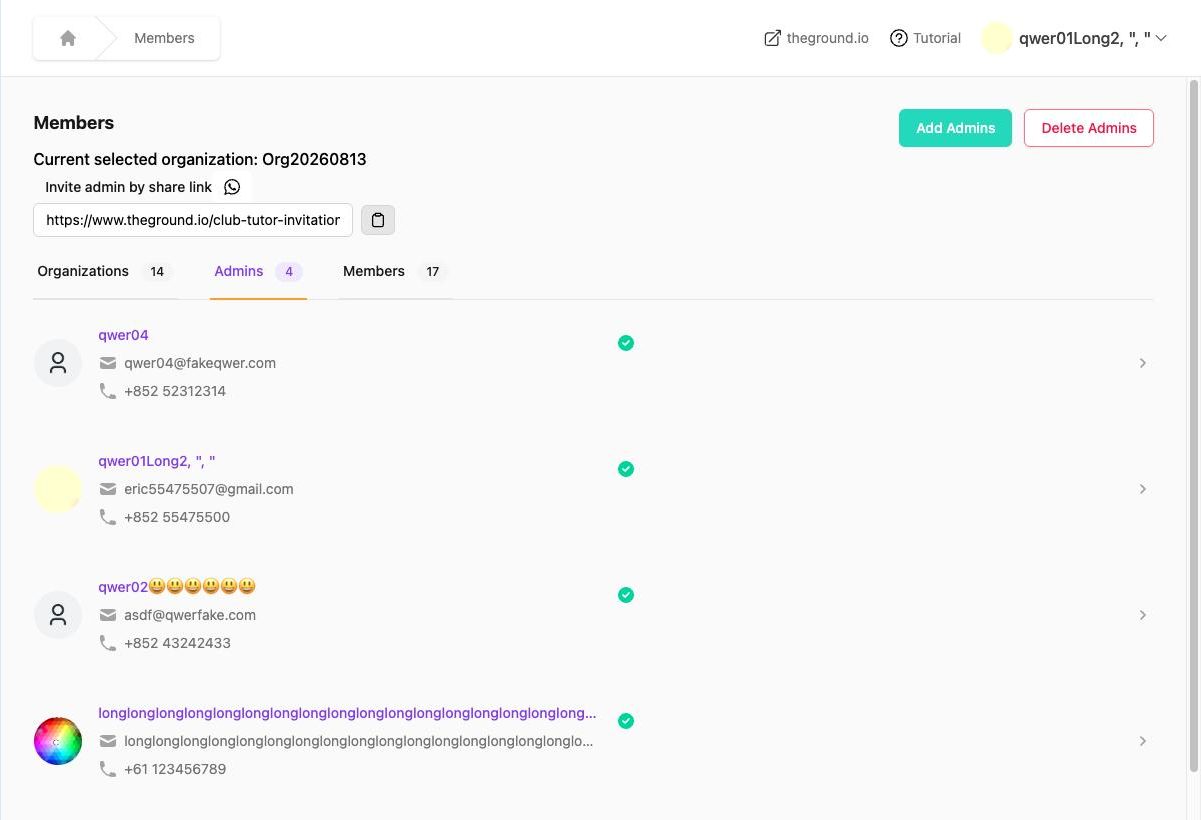
- Sidebar → Members → Admins tab.
- Copy the Invite admin by share link URL (copy icon) or use the WhatsApp icon to send it directly.
- The person opens the link, signs in or creates an account, and becomes an admin of this organization. They will see it in their sidebar dropdown.
Add an admin from your member list#
Members → Admins tab → Add Admins → tick people who are already members of the organization → confirm. Useful for promoting a long-standing member to coach or co-organizer.
Remove an admin#
Members → Admins tab → Delete Admins → tick → confirm. They lose access to the admin for this organization immediately but stay a member of events / teams they joined. You cannot remove the last admin of an organization.
Give access to one event or team only#
Add the person as an organization admin first (above), then in the event → Setting → Permission & Visibility → Admins, or in the team → Setting → Admins, tick their name and Update. Details in Event admins.
"You do not have access"#
Opening an event, team, activity or session you are not an admin of shows "You do not have access to this event / team / activity / session". Ask an organization admin to add you, or check that the right organization is selected in the sidebar.
Admins and Stripe#
Only organization admins can start Stripe onboarding ("You do not have permission to access Stripe Connect for this company" otherwise). Stripe's own dashboard login is separate – the admin who completed onboarding holds those credentials.