
Group tickets and group discounts
Let one person book several seats in one go, and reward bigger groups with tiered per-seat prices.
Group tickets#
By default each member books one seat. Group tickets lets a member choose a quantity (up to the maximum you set) and pay for all of them in one transaction. Approval and payment are handled together for the whole group – "The approval and payment confirmation will be processed together".
- Create Event → Step 2, or event → Setting → Ticket card.
- Tick Group tickets and enter the maximum tickets per person (e.g. 4).
- Save / Update.
Rules: the maximum must be at least 2 ("Group ticket must be at least 2.") and cannot exceed the event capacity ("Group ticket cannot exceed capacity.").
How it shows up later:
- The member's card shows No. of ticket(s); the Member tab header counts seats against Capacity.
- The attendee's QR code covers the whole group – at the door you enter how many people have arrived (head count). See Check-in.
- Only the booker is a member; the friends do not need accounts.
Group ticket discounts#
With group tickets on, click Add discounts / Edit discounts to create per-seat price tiers based on how many tickets are bought.
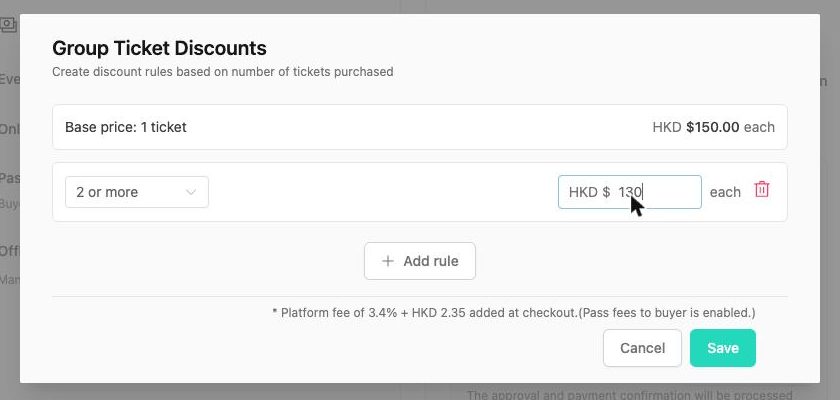
- The dialog shows Base price: 1 ticket → HKD 150.00 each.
- Click Add rule. Choose the threshold (2 or more, 3 or more …) and the price each in HKD.
- Add more rules if you like – each must require more seats than the previous one and the seat options stop at your group-ticket maximum ("No more seat options available for another rule.").
- Click Save, then Update the event. Clear rules removes them all.
Rules the admin checks: at least one rule ("Please add at least one group discount rule."), minimum seats ≥ 2, ascending thresholds, and a unit price between HKD 10.00 and 100,000.00 ("Unit price must be between 10.00 and 100000.00 HKD."). You need a valid base price first ("Set a valid base price first.").
Example#
| Tickets bought | Price each | Total |
|---|---|---|
| 1 | HKD 150 (base) | 150 |
| 2 (rule "2 or more → 130") | HKD 130 | 260 |
| 3 (rule "3 or more → 120") | HKD 120 | 360 |
The event page shows the tiers as "× 1 ticket – HKD 150.00 · × 2 or more – HKD 130.00".
With other pricing features#
- Early bird – the tiers apply to whichever base price is in force when the member pays.
- Pass fees to buyer – the fee is added to the discounted total at checkout; the dialog reminds you: "Platform fee of 5% + HKD 2.35 added at checkout."
- Promo codes – a fixed amount off per seat, applied after the group tier. The admin verifies every tier minus the promo is HKD 0 or ≥ HKD 10.
- Multiple ticket types – group tickets and discounts are set per ticket type, and the discount option is disabled until that ticket has group tickets with a maximum of at least 2 ("Turn on group tickets and set maximum tickets per user to at least 2.").
Editing the booker's seats#
Once booked, the number of tickets is part of the payment. If a group shrinks, refund the difference (Refunds – one refund per payment) or handle it offline, and note it in the member's Internal Record.